What is Igs file?
|
Igs is file format that allows digital exchange of information between CAD systems.
With Igs, CAD user can exchange product data models in the form of wireframe, circuit
diagrams, freeform surface and solid modeling representation.
Igs or Iges means Initial Graphics Exchange Specification, and is published in January
1980 by National Bureau of Standards. Iges file is divided in 5 sections: Start (S), Global (G),
Directory Entry (D), Parameter Data (P) and Terminate (T).
Iges standard was first ANSI standard to be documented by itself. Since version
4 all of the technical illustrations for the printed version of the standard have
been generated from Iges files.
|
|
|
How to open an Igs file?
IGS Viewer is a professional tool used for viewing CAD models with excellent speed
and quality. IGS Viewer boast a very user-friendly interface for beginners users
and in the same time provide full range of tools for navigation and analyzing the
3D object. For advanced users of this kind viewers there are most of the known command
as on any 3D viewer, and for beginners and non-technical users there is a help,
and explanation on every tool how to use and what that tool do while using IGS viewer.
Interesting feature in IGS Viewer is tree view where are showen all markers that
are used in 3D object. You can easily hide or unhide them and see all object part
by part. With IGS Viewer except zooming and panning you can see the object in 2D
in any of the 4 sides (top, bottom, left, right), you can add shade to the object
to see how will look like as an real object or to see only wireframe. IGS Viewer
also allow changing color of wireframes or shade of 3D object.
|
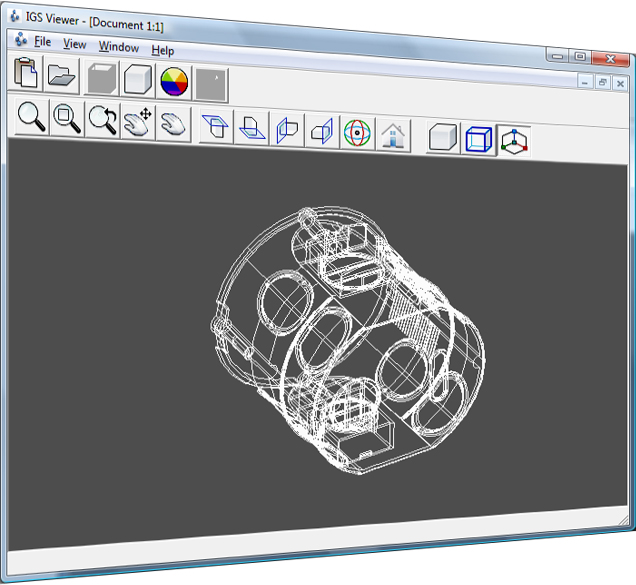 IGS Viewer is a tool for viewing international IGES standard files. IGES files (.igs,
.iges file format) for 3D and assembly are often used by all major mechanical CAD
systems. With this absolutely FREE IGS Viewer you can easily open 3D files (*.igs),
rotate them and perform some basic actions like: zoom, rotate, move or change skin
and skin color. Download IGS file viewer
and start viewing the world in 3D. Please refer to the
Walk Thru section for more information's and screenshots.
IGS Viewer is a tool for viewing international IGES standard files. IGES files (.igs,
.iges file format) for 3D and assembly are often used by all major mechanical CAD
systems. With this absolutely FREE IGS Viewer you can easily open 3D files (*.igs),
rotate them and perform some basic actions like: zoom, rotate, move or change skin
and skin color. Download IGS file viewer
and start viewing the world in 3D. Please refer to the
Walk Thru section for more information's and screenshots.
|
|
|
IGS Viewer Key Features
- Change transparent level 1-10 for shade-skin
- Dynamic zooming from toolbox or with mouse
- 2D view in all 4 sides of 3D object
- Dynamic rotation by toolbox or with pressing and hold middle mouse button
- Adding shade of the 3D object and change color of the skin
- View only wireframe and change color of the lines
|
Why do you need a IGS Viewer?
When you open 3D object (IGS files) you need speed and good interface to view every
detail in that 3D object. IGS Viewer provides all this features. With ability to
add shade-skin, you can see every part how should/will look like in real. Rotateing
the object allowing you to see every detail in every side of the 3D object. With
wireframe and rotateing in the same time you can see all elements that created 3D
object as one whole.
All these elements that we mentioned in the text above are implemented in our IGS
Viewer, and the best of all is that IGS Viewer is a FREE tool.
|
Requirements?
- Supported Operating Systems: Windows Server 2003; Windows
Server 2008; Windows XP; Windows Vista; Windows 7.
- Microsoft
.NET Framework 2.0 (included in Windows XP SP2, Vista, Windows 7).
|
Related Downloads
3D object are avaliable in many types of file extensions. As the most popular extension
for 3D objects except .igs are .stp and .stl file extension. For opening this types
of file extensions there are many viewers as STP Viewer
and STL Viewer, that are totally FREE for use
and provide many tools for better viewing and working with 3D objects.
|
|
|